Websites are built almost solely on its communities. In the case of blogs, the communities hang out in the comments section. That’s where all the socialization and exchange of ideas take place. But writing a thoughtful comment alone is difficult enough. Don’t make it any harder for your readers.
This is one of the most horrifying comment areas out there:
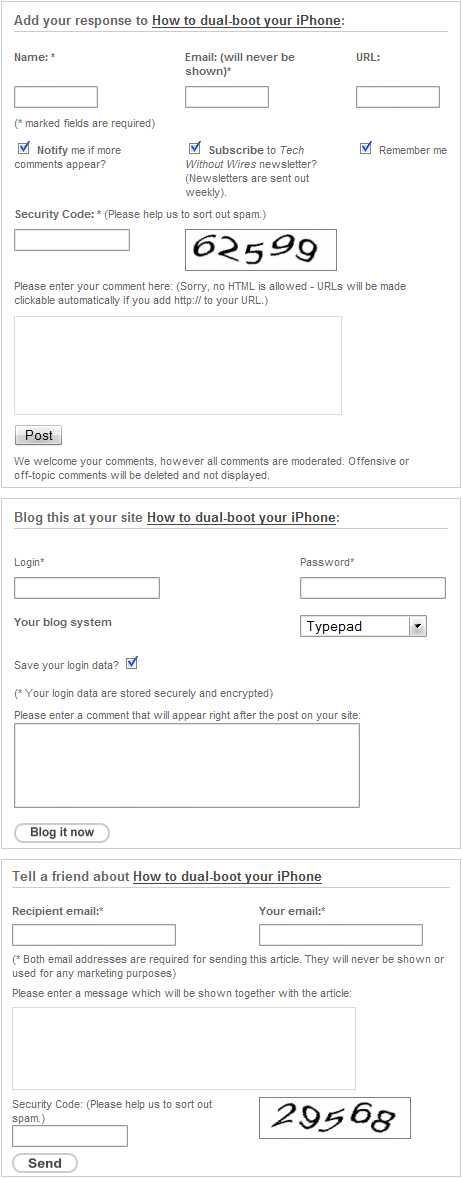
Now that’s a long scroll. This isn’t from a product landing page or a shopping site with pages upon pages of “special” offers. This is a blog, for crying out loud!
Let’s assume for a second that only the top box (which is the actual comment form) exists and focus on that. It’s just too busy! My eyes were all over the place with the sprawling combination of boxes and text.
I know it takes effort to align form elements. (Or not, since this particular site uses tables to do that.) But it would be much easier on the eye if all the input fields appeared in a linear fashion, one after the other, to minimize the confusion.
Linear is not always necessary, but always keep forms as simple as possible, if you can help it. Take a cue from Smileycat’s comment form design showcase and note how functional and uncluttered those forms are.
Okay, so you get through the ordeal of leaving a comment, but this blog says you’re not done yet! It continues to nag you with the “Blog this at your site” and the “Tell a friend” sections. It doesn’t help that the lack of comments subconsciously discourages the reader from actually commenting. Even if there are any comments, those two extra panels have already separated the reader from the “leave a comment zone” since the comment box is now too far away.
The Share This button is certainly more desirable, both in form and function, than these bulky boxes. If you don’t think a button will cut it, what about collapsible panels with JavaScript?
Since the comment form above belongs to a blog in a blog network, many more readers will be turned off and confused by this comment form on several different blogs. It’s not too difficult to elminate this usability problem: Don’t complicate the process. Don’t ask too many questions. Don’t look desperate. Just let them comment.
Originally posted on July 25, 2011 @ 4:09 am